Skip to content
Book a demo (opens in a new tab)

Platform.

Thirteen modules that work as one system. Each one knows what the others do. Screenshots show the current app, which runs in Serbian.

Module 01

AI assistant

Ask your company through AI. Answers are deterministic: the same question on the same data always gives the same exact result, calculated from your data. With every answer you see how it was calculated: the sources, the steps and the formulas.

Fencetimator

You: Which rep has the most quotes older than 30 days with no reply, and how much money is waiting there?

Fencetimator: Neil H.: 17 quotes, £64,300 in total. The oldest has been waiting 74 days.

Verified: calculated from your company data
How it was calculated

Which rep has the most quotes older than 30 days with no reply, and how much money is waiting there?

£64,300

Neil H.: 17 quotes · the oldest has been waiting 74 days

Data sources

  • Quotes1,3962025 and 2026
  • Reps5active

Calculation flow

  1. SOURCE: Quotes, 1,396
  2. FILTER: Status: Open, 112; input: Quotes
  3. FILTER: Older than 30 days, 52; input: Status: Open
  4. SOURCE: Reps, 5
  5. FILTER: No reply from customer, 41; input: Older than 30 days
  6. ENGINE · GROUPING: By rep, Neil H.: 17; input: No reply from customer, Reps
  7. SUM: £64,300; input: By rep
  8. FORMULA · OLDEST: 74 days; input: By rep

Formulas

  • Age = today − date sentover 30 days
  • Value = Σ quote total (17 quotes, Neil H.)£64,300
  • Oldest = 18/10/2026 − 05/08/202674 days

Definitions

  • No reply from customer: the customer has neither accepted nor turned down the quote, and no contact is recorded since it was sent.
  • Age: the number of days from sending the quote to today.
  • Rep: the user who handles the quote.

Deterministic: the same question on the same data always gives the same result

Data as of 18/10/2026 at 09:14

Module 02

Calculator and map

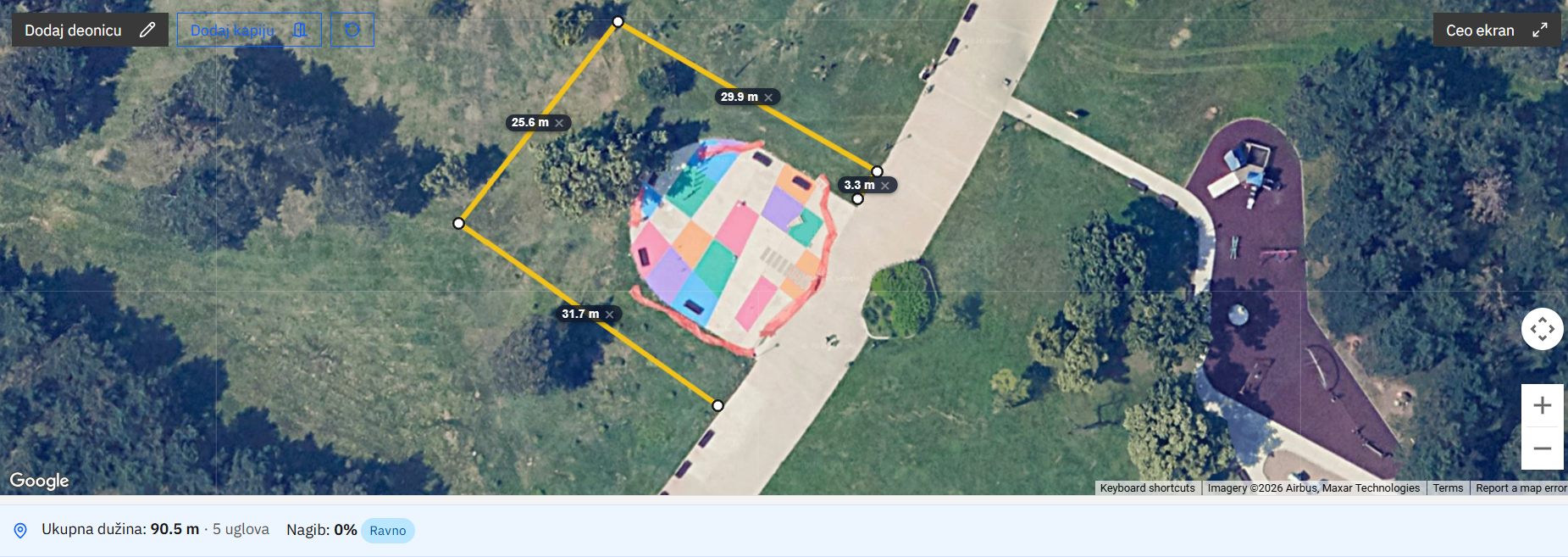
Draw the fence on the satellite view, and the length of every run and the number of corners are worked out for you. The quote calculator is linked to all your prices and materials, from panels, posts and gravel boards to gates and fitting. A quote in under 2 minutes.

Calculator and map
The Fencetimator calculator, in the current Serbian interface, with a four-run fence drawn along a plot boundary on the satellite view, the length of each run, 5 corners and a total of 90.5 m.
Calculator and map
The Fencetimator calculator, in the current Serbian interface, with a four-run fence drawn along a plot boundary on the satellite view, the length of each run, 5 corners and a total of 90.5 m.

Module 03

Quotes

Branded quotes as PDF and Excel, in pounds with VAT shown. Numbering, several text variants and optional items. Several quote templates with your logo and banner, and extra fields per template. The customer gets a link and accepts the quote in one click. An accepted quote is locked, and every later change is recorded.

Quotes

Module 04

VAT and reverse charge

The system knows whether the customer is a homeowner or a VAT-registered contractor buying work that falls under CIS. It applies 20% VAT or the domestic reverse charge by the rules, with separate VAT rules for each type of customer. Net, VAT and total are always right on the quote and the deposit invoice.

VAT and reverse charge

Module 05

Deposit invoice

The deposit invoice is created from the quote, with your bank details, the account name exactly as your bank holds it and the quote number as the payment reference. When the quote changes, the deposit invoice is marked as out of date.

Deposit invoice

Module 06

Customers

Businesses and homeowners, company and VAT numbers with checks, VAT-registered contractors, tags and the full history of every customer. Import from any Excel or CSV file, with the columns recognised for you and duplicates flagged.

Customers
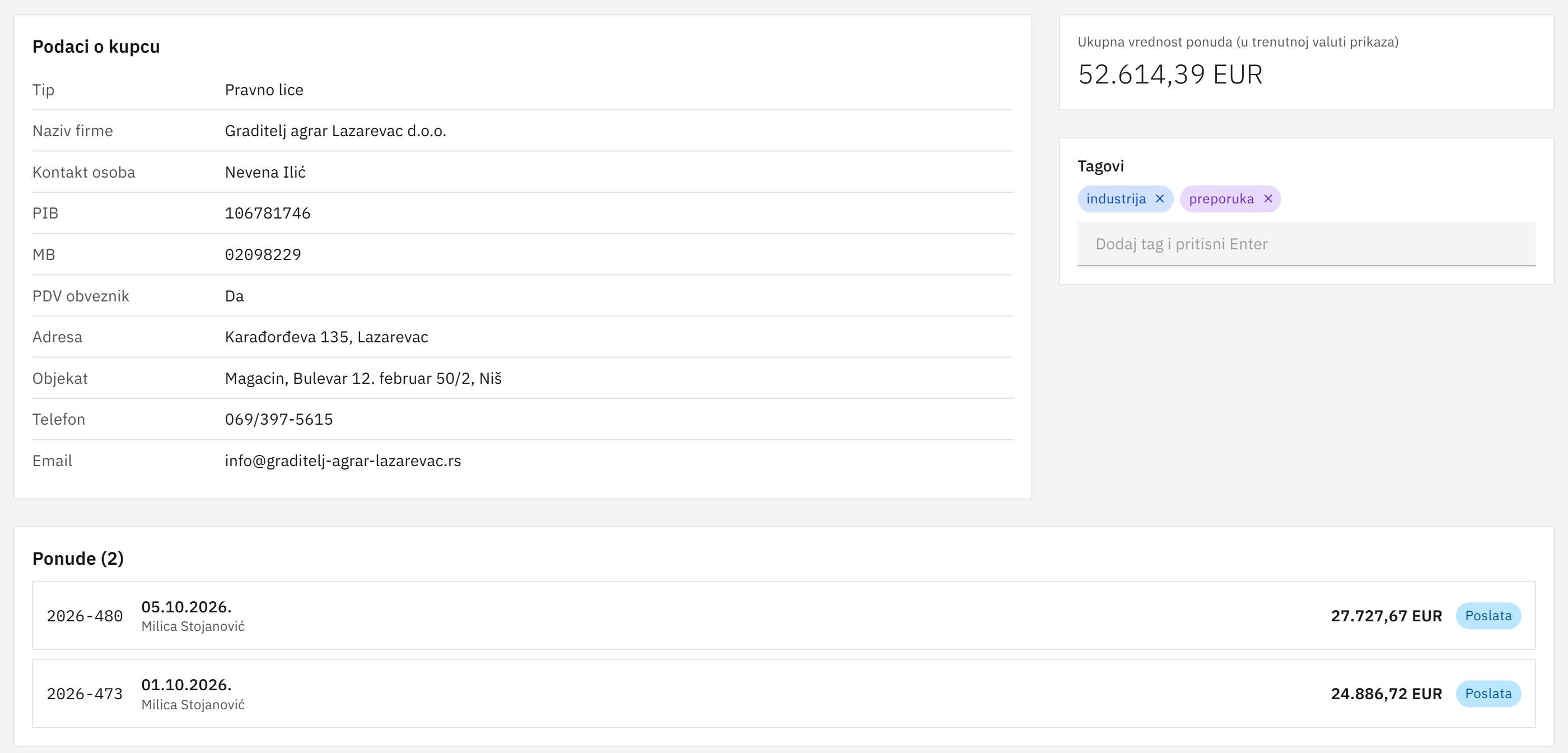
A customer page, in the current Serbian interface, with company details, tax numbers, tags and quotes.
Customers
A customer page, in the current Serbian interface, with company details, tax numbers, tags and quotes.

Module 07

Projects

Every project has an owner and a clear status. Customer, rep, quotes, fitting dates and hours worked sit in one place. Documents, notes and team comments stay with the project.

Projects
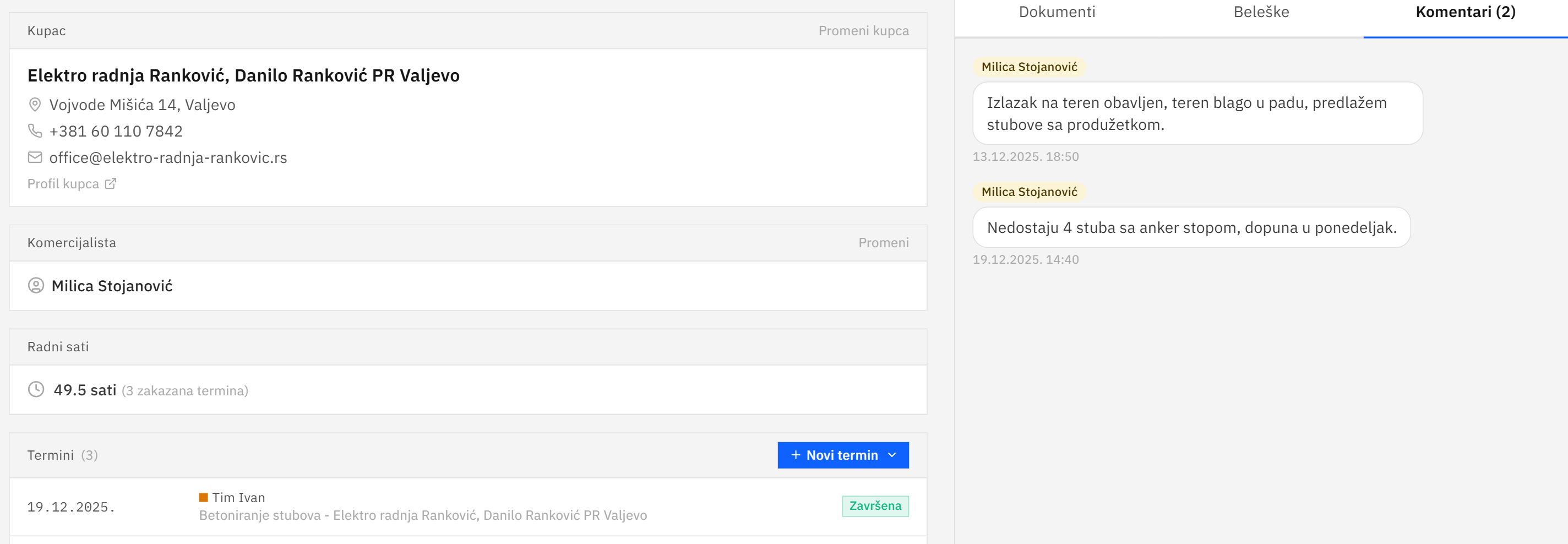
A project page, in the current Serbian interface, with the customer, rep, hours worked, fitting dates and team comments.
Projects
A project page, in the current Serbian interface, with the customer, rep, hours worked, fitting dates and team comments.

Module 08

Scheduling

The schedule for every team by day and week. Booked days show at a glance, jobs move by drag and drop, and the job sheet prints in one click.

Scheduling
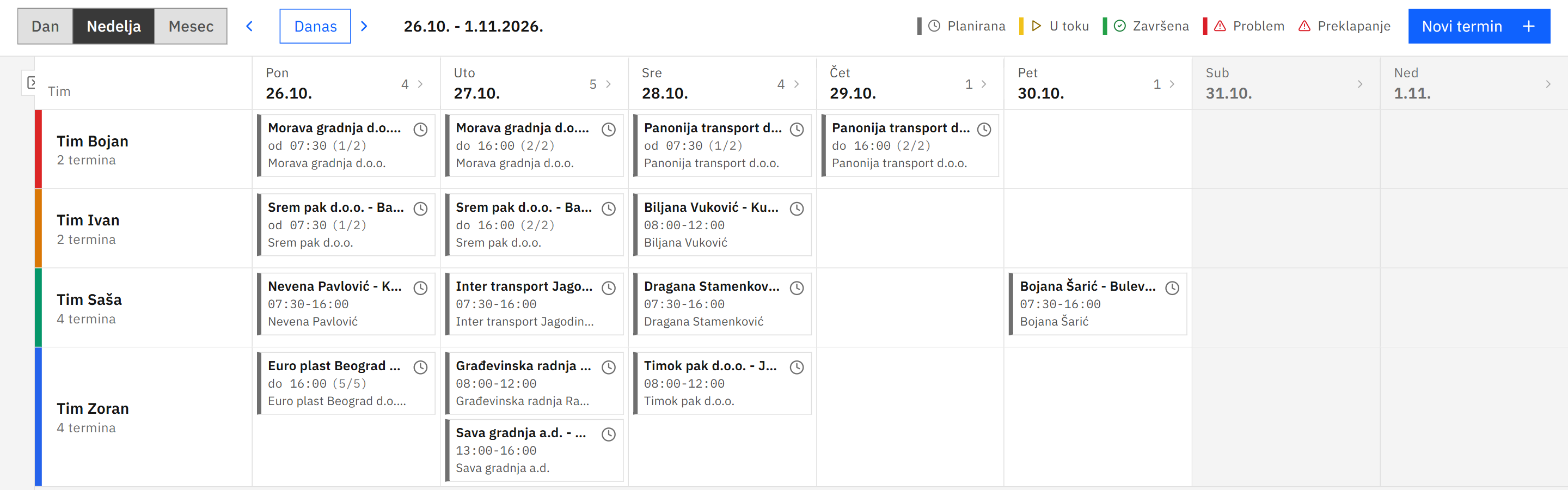
The weekly schedule of four teams in Scheduling, in the current Serbian interface, with fitting jobs by day.
Scheduling
The weekly schedule of four teams in Scheduling, in the current Serbian interface, with fitting jobs by day.

Module 09

On site

Teams see their jobs, the address and the job sheet on the phone. They update the status and add photos, and the customer signs a digital handover sheet when the work is finished.

On site

Module 10

Payments

Every accepted quote on one screen, with the paid and outstanding amount for each. Deposit and balance with due dates, days overdue, payment records and reminders. The total to collect and everything overdue are visible at once.

Payments
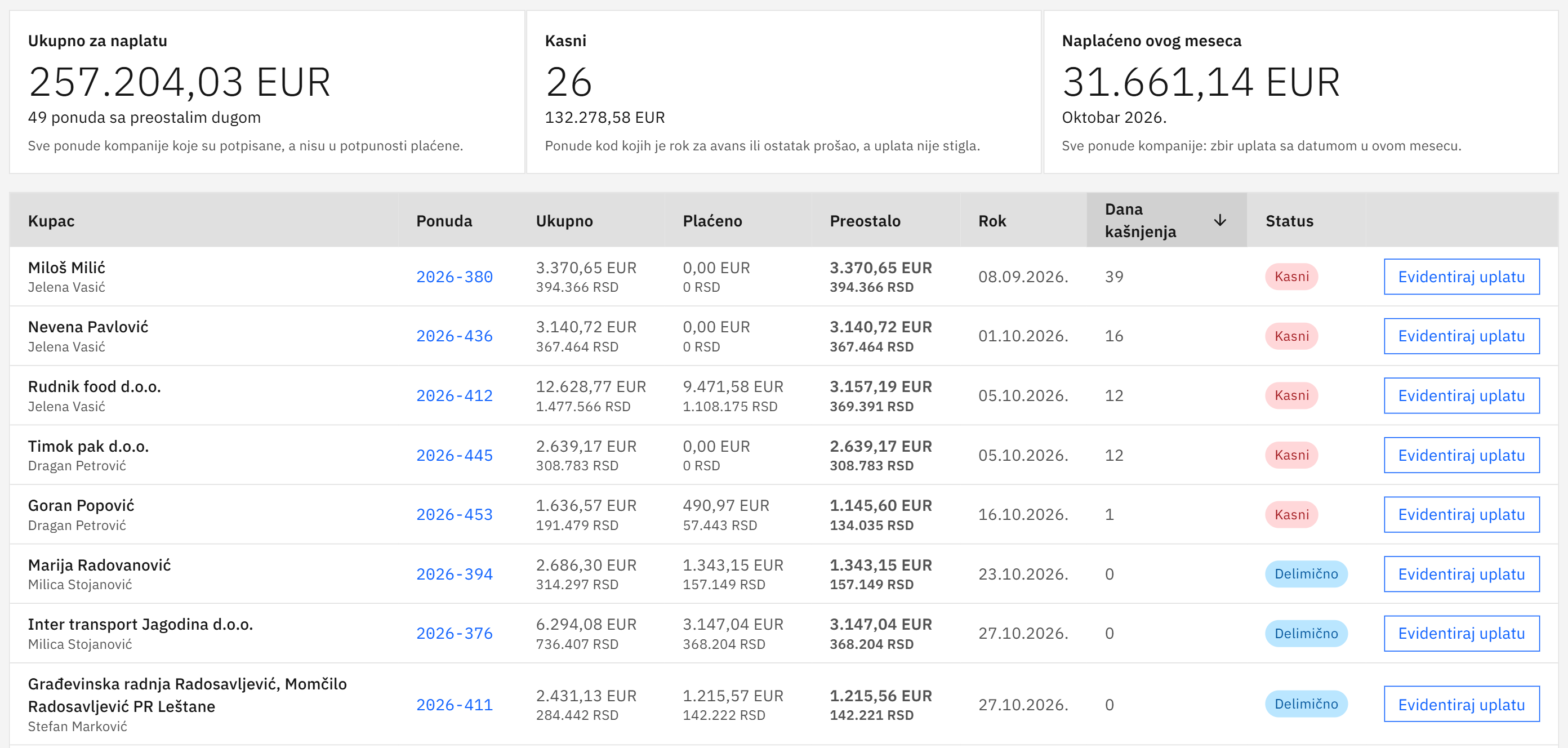
The Payments screen, in the current Serbian interface, with the total to collect, days overdue and quotes that are overdue or part paid.
Payments
The Payments screen, in the current Serbian interface, with the total to collect, days overdue and quotes that are overdue or part paid.

Module 11

Accounts

Invoices and the payments from your bank statements match themselves to the right customer and the right quote. For every quote you see its invoices, payments and amounts. The whole company looks at the same numbers.

Accounts

Module 12

Performance

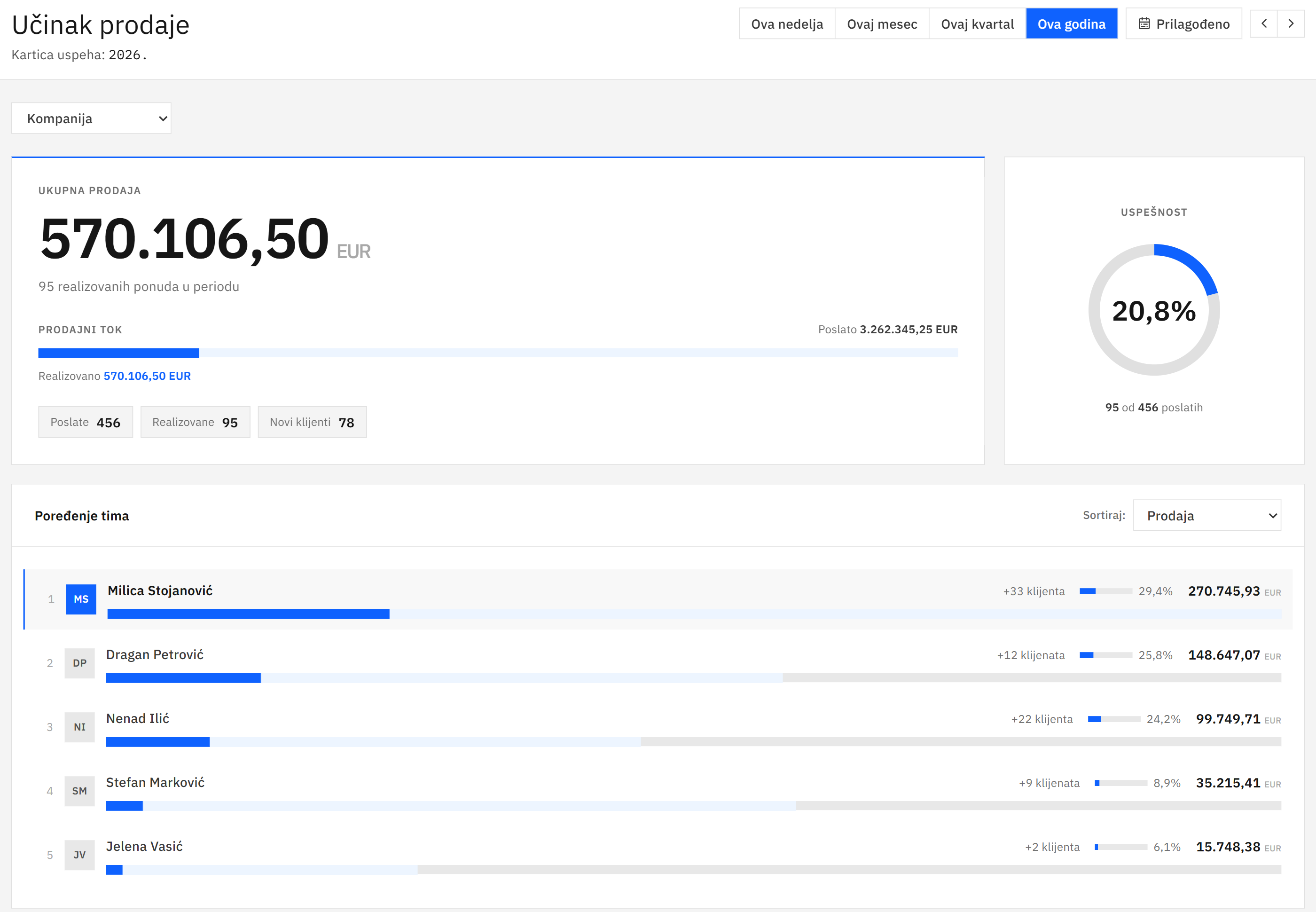
KPIs per rep: quotes sent and won, win rate and sales in any period. Reports and trends by week, month, quarter and year. A dashboard with reminders for everything that is waiting.

Performance
Sales performance for this year, in the current Serbian interface, with total sales, win rate and a team comparison.
Performance
Sales performance for this year, in the current Serbian interface, with total sales, win rate and a team comparison.

Module 13

Price list

A price matrix by height, type, treatment and any other product property, and every item has its own code. Bulk changes, for example +8% on all closeboard panels, with a history of every change. Excel import and export, and AI sets up the price list from Excel, PDF or a photo of a merchant invoice.

Price list

FOR THE WHOLE COMPANY

What the whole company uses.

  • Quote templates with your logo and banner

  • Excel import and export, both ways

  • Pounds, metres and UK dates throughout

  • Mobile view for teams on site

  • Unlimited users

  • Full history of every change

THE FENCING COMPANY ONTOLOGY

Years of data become your advantage.

Bring in everything you have. Fencetimator turns it into one model of your company that AI understands. The model gives you a real view of the business, and that view leads to automation.

  1. Step 01

    Bring in everything you have.

  2. Step 02

    Fencetimator understands your data.

  3. Step 03

    See the real picture of the business.

  4. Step 04

    The company works smarter.

Built only for the fencing industry. Fencetimator knows thousands of products, variants and names from the trade, and how customers, quotes, fitting and payments connect in a fencing company.

Before anything enters the system, you review and approve it. Fencetimator does not use your data to train AI models.

See your company in Fencetimator.

The demo takes 30 minutes. We show the platform and the AI with examples from fencing work.